Every platform claims the same order
Google, Meta and the marketplace each count the sale as theirs. Add their reports up and ads “brought” more than the store sold. The number that matters — orders in your own system — lives somewhere else.
Orders from the website, marketplaces and account sales, margin after fees, ad spend, search, email and quotes — in one report that rebuilds itself every night. Revenue is counted once, from your order system, not from what each ad platform claims.
The demo is open by link — no sign-up, no salesperson. The store and every number in it are made up.
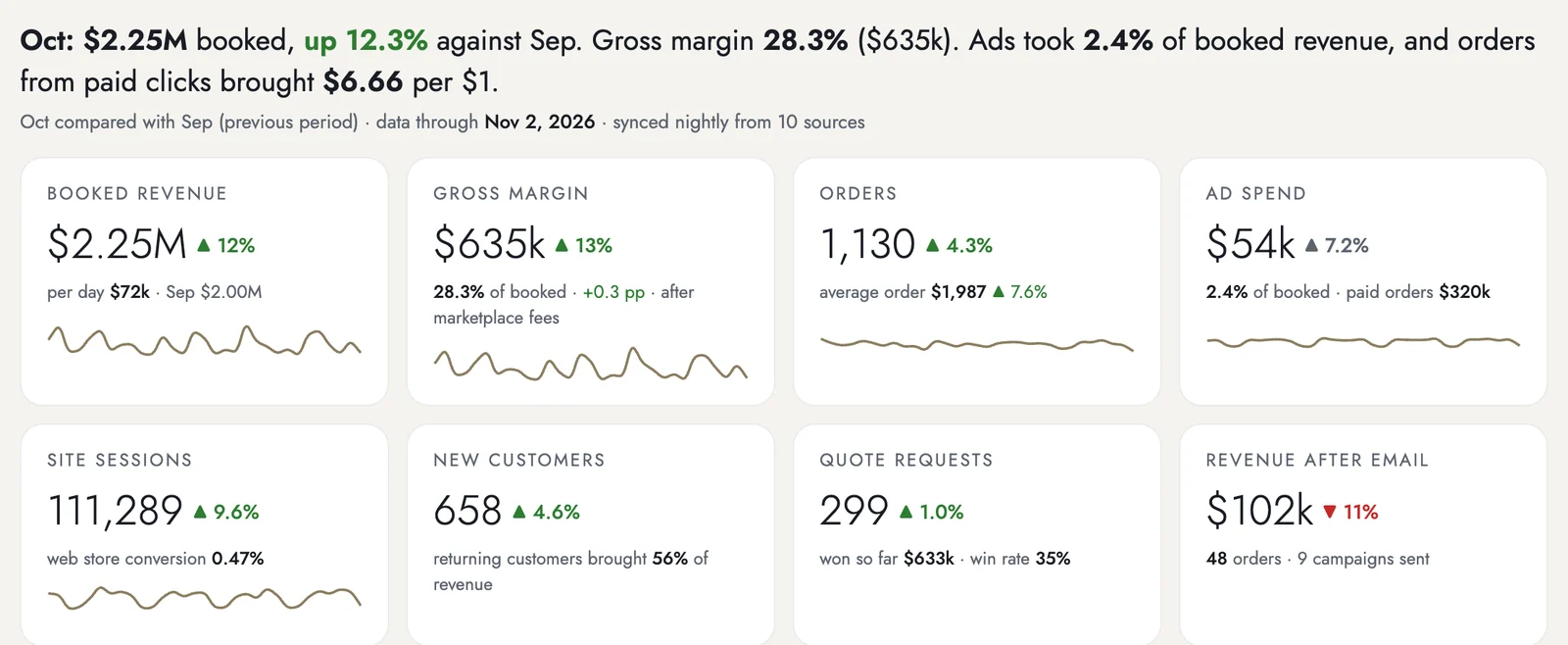
Three places where money leaks every month. Each system shows its own slice correctly — the trouble is that nobody sees them side by side.
Google, Meta and the marketplace each count the sale as theirs. Add their reports up and ads “brought” more than the store sold. The number that matters — orders in your own system — lives somewhere else.
The store shows revenue, the ERP shows cost, marketplace fees arrive in a separate statement. Margin by channel and product line gets assembled in a spreadsheet — once a quarter, if at all.
A bestseller runs out, and Shopping ads keep paying for clicks to a product nobody can buy. Stock and ad spend live in different systems, so nobody looks at them on one screen.
All of it is open in the demo right now: a made-up retailer of refurbished servers, by link and without sign-up.
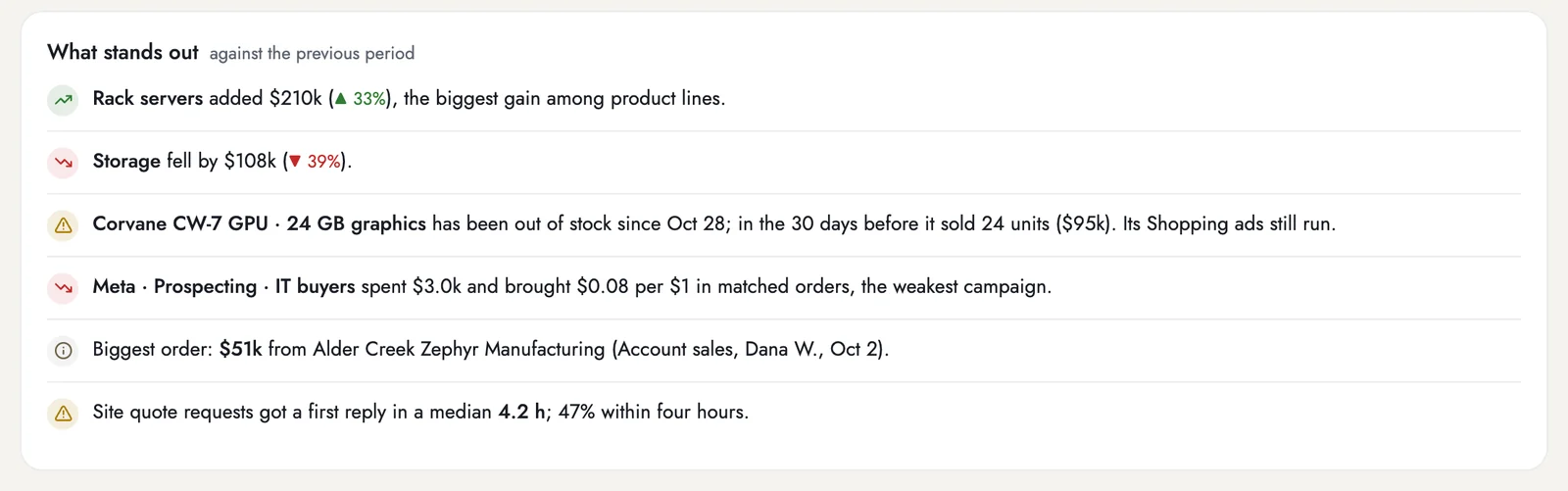
Every morning the report compares the period with the previous one and writes down what moved: which product line grew and which fell, what sold out while its ads keep running, which campaign brings the least per dollar, how fast quote requests got a first reply.
Each line is built from the same numbers as the tables below it, so any of them can be checked in two clicks.
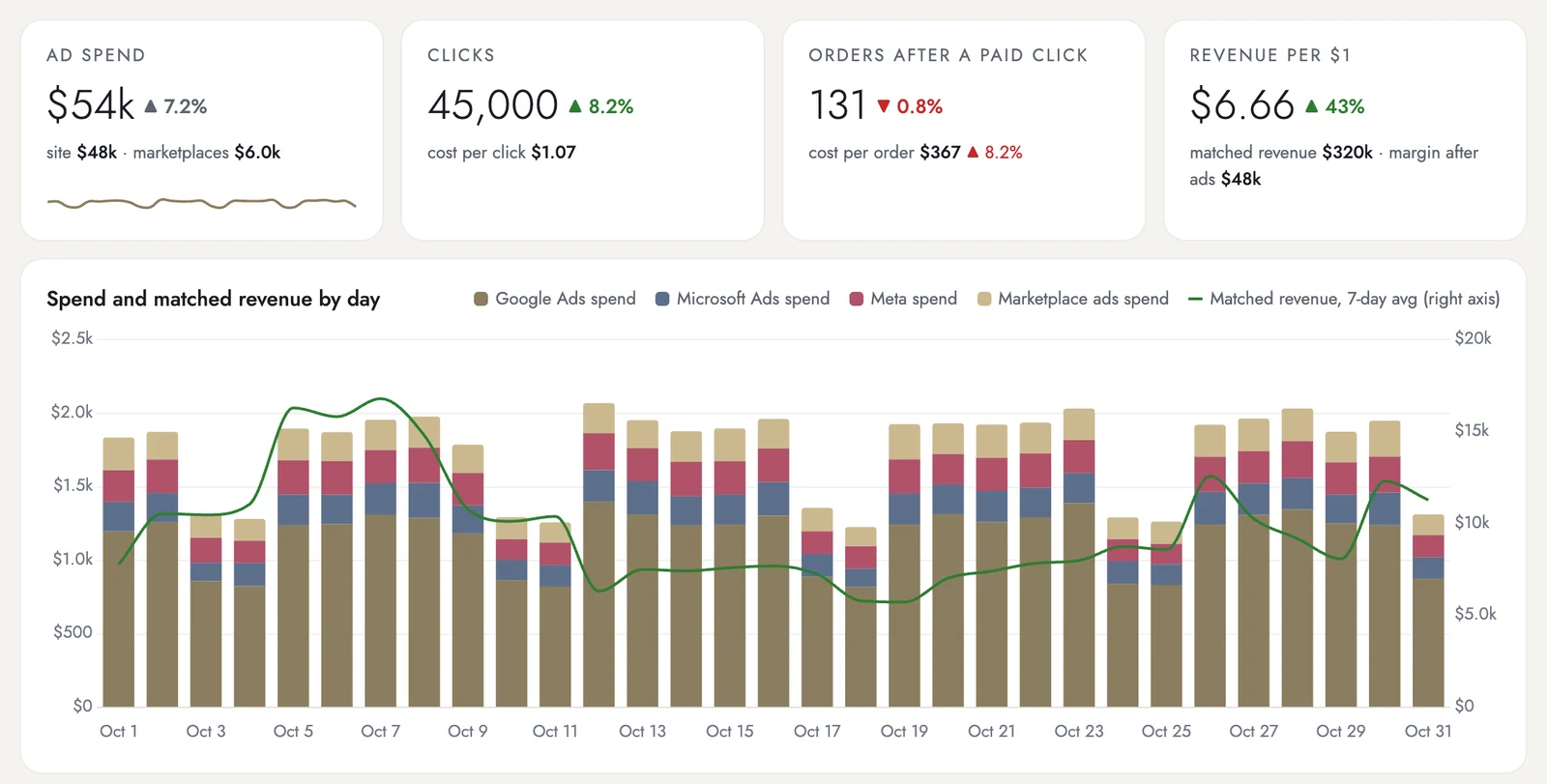
Google, Microsoft and Meta spend sits next to the orders matched to paid clicks in your order system: revenue per $1 of ads and margin left after ads. What each platform reports about itself stays in the table too — you see both numbers and the gap between them.
Matching needs tracking: the click ID or UTM tags have to reach the order. What can't be matched stays visible as unmatched — I don't spread it across channels with a model. How much matches on your data, I'll tell you at the audit.
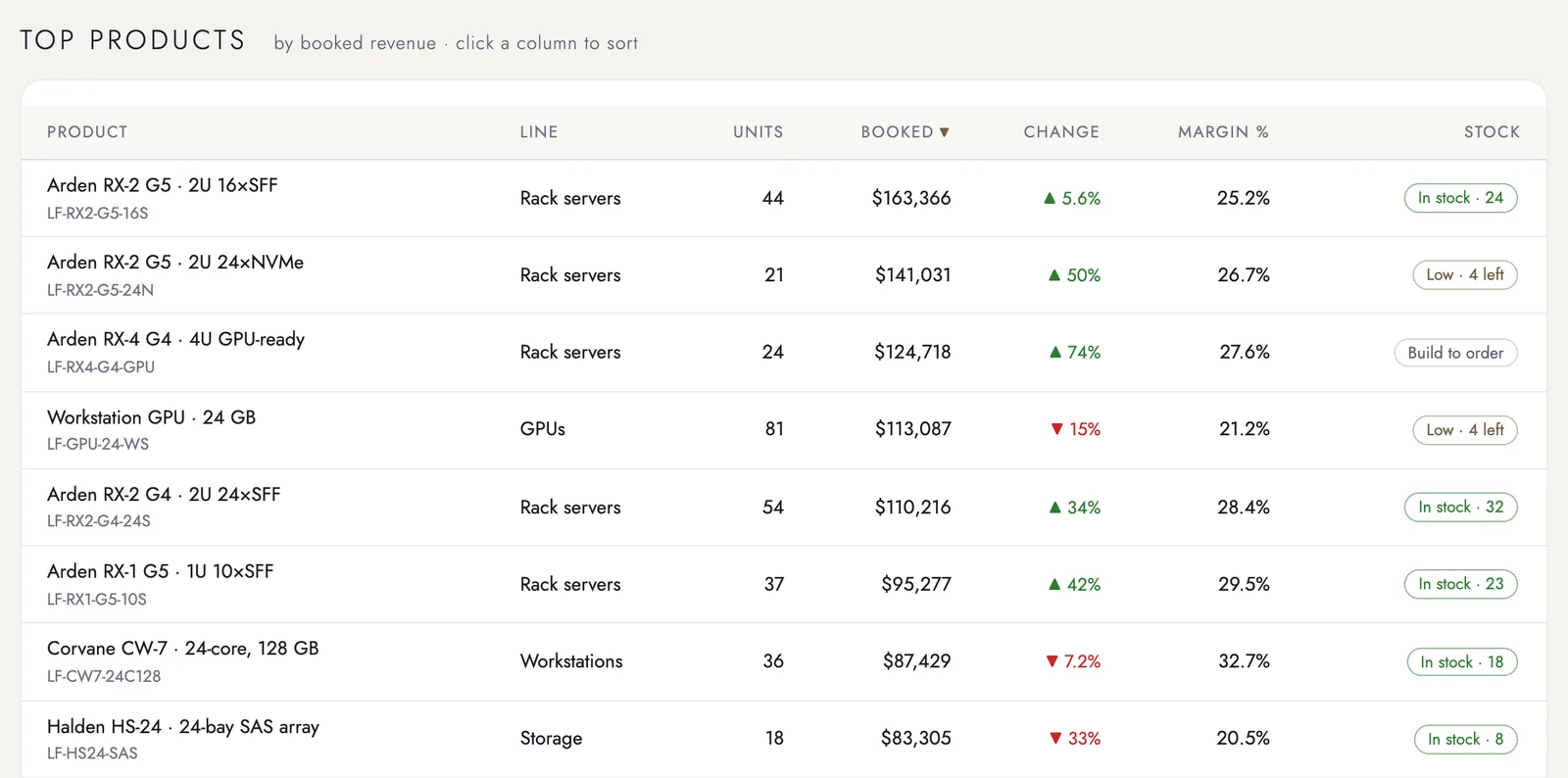
Product lines and top SKUs with units, booked revenue, change against the previous period, margin after marketplace fees and stock status.
A separate stock watch lists what's running low, what's out and what's built to order — with days of cover by the last 30 days of demand. Reordering is decided by the numbers, not by the warehouse manager's memory.
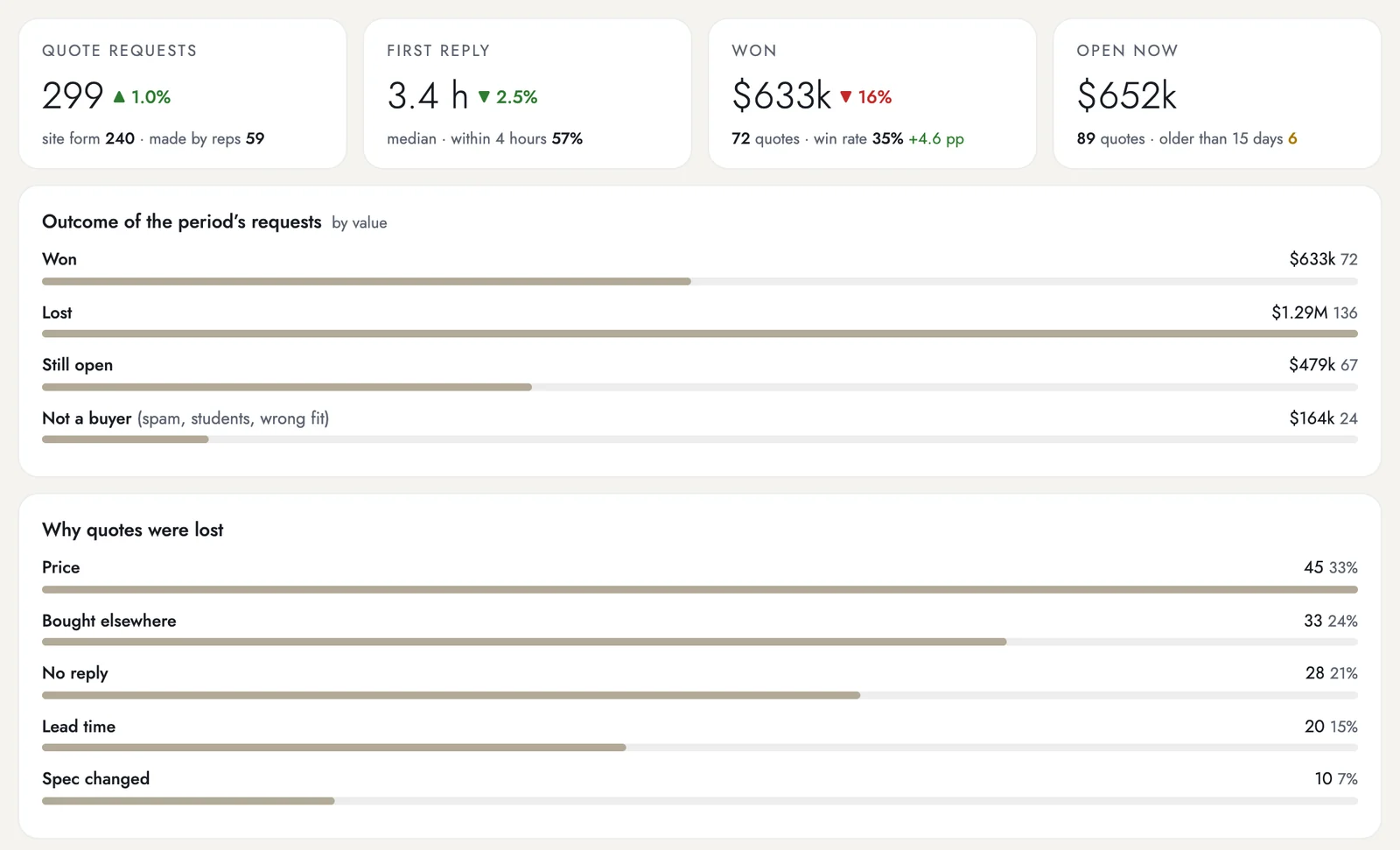
For stores that also sell to businesses: how many quote requests came in, how fast the first reply went out, how much was won, what's still open and why quotes were lost. Win rate by quote size shows where the team is strongest.
No quotes in your business? This screen simply stays off — you don't pay for it separately either way.
Retail data is messier than it looks from the outside: the same product under three SKUs, orders split between the site and the ERP, fees that arrive a month late. So these three I count on your numbers, not on mine.
What share of orders can be traced to a paid click depends on your tracking. I count it on last month's data before we sign an agreement: a promise made blind is worth nothing.
An on-premise ERP or warehouse system is connected through a scheduled export or a small connector inside your network. I estimate that work at the audit, and it's in the onboarding price — not in a surprise invoice later.
I don't redistribute revenue between channels with an algorithm. An order matched to a click is counted, the rest stays unmatched. It looks less impressive than a model's chart, but every number can be traced to an order.
The first step is free and commits you to nothing: you'll decide on your own numbers, not on my presentation.
3 business days, free. No access needed: you send last month's orders with cost and the ad spend by campaign.
Exports from the ERP or the store admin and from the ad accounts are enough. I'll send back one page — margin by channel, revenue per $1 of ads counted by your orders, what sold out while its ads kept running — and we'll talk for half an hour.
2–3 weeks. Store and ad accounts read-only first, then the ERP, marketplaces, email and CRM. It takes three or four hours of your time.
If the ERP only works inside the office, I need your system administrator or integrator for half a day. That's also when we agree on product lines, channel groups and what counts as margin — after fees, after shipping, or both.
I pull history as far back as your sources allow. How much you'll get, I'll tell you at the audit, before we sign an agreement.
The report rebuilds every night. Once a week — a short digest by message. At the end of the month — the report.
A 30-minute review call is included in the plan — once a month.
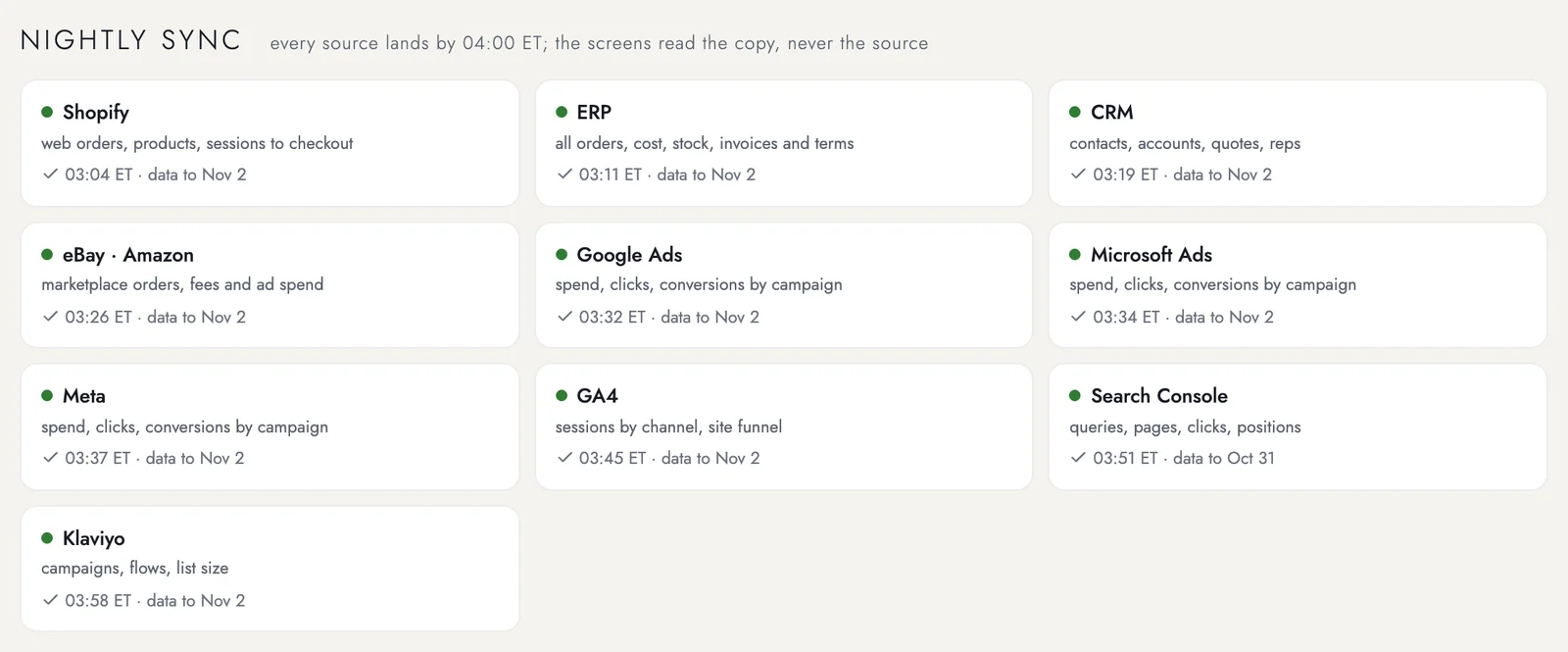
The report never queries your live systems while you look at it, so it can't slow down the store or lock the ERP. Overnight it takes a copy from every source — store, ERP, CRM, marketplaces, ad accounts, GA4, Search Console, email — and all the screens read from that copy.
Next to every source stands when it last arrived and how fresh its data is. If something didn't come in, you see it on that card — not as a quietly wrong number in a table.
Access is read-only everywhere. From the ERP and CRM I take only the agreed fields: order, date, channel, items, amount, cost, stock, account. The list goes to you in writing before onboarding.
Margin isn't for everyone. Roles are part of the plan: the owner sees everything, the sales lead sees accounts and quotes, marketing sees ads, search and email — without margin and with customers shown as account numbers. Who sees what, you decide at onboarding.
I charge not per user, per SKU or per order, but per store: the fifth person on the team who opens the report costs nothing.
One online store: your own website, up to two marketplaces and one order system or ERP.
$349 / mo
One-time onboarding — $790
Monthly, or a year at 15% off — that's $628 saved over the year
Several stores or brands, more marketplaces, warehouses in more than one place.
On request
Ballpark — from $690 a month, onboarding from $1,500
The price is fixed per company, not per store
The plan isn't the whole bill: in the first month the one-time onboarding is added to it. I name both numbers up front so the second one doesn't surface in the invoice.
| First month | Per month after that | |
|---|---|---|
| Store | $1,139 | $349 |
| Network | from $2,190 | from $690 |
Onboarding covers connecting the store, the ERP, marketplaces, ad accounts and email, setting up product lines, channel groups and roles, and the first month of support; with annual prepayment it costs half as much.
| Store admin and ad accounts | Looker Studio or Power BI | Otdacha | |
|---|---|---|---|
| Costs | $0, already paid for | $0 plus connectors and an analyst | from $349 |
| Margin by channel after fees | no | if someone builds it | yes |
| Ad revenue counted by your orders | each platform counts its own | with a lot of work | yes |
| Stock next to ad spend | no | rarely | yes |
| Who keeps it running | — | your analyst | I do |
The table scrolls sideways →
Payment in dollars to the account of a sole proprietorship registered in Georgia; an invoice in local currency is converted at the official rate of your National Bank on the invoice date, which is printed on the invoice itself. There are no discounts off the price list: there is −15% for paying a year up front, and on “Store” that's $628 a year.
And they show the website well. What they don't have:
And honestly: if you sell only through your own website and margin is the same on every product, the store admin is enough for you right now.
You can, and some do. It's a project: connectors to every source, a model that joins orders, cost and ad spend, and a person who fixes it every time a platform changes its export.
With me you pay for the result rather than the project: the report rebuilds every night, and when a source breaks, I'm the one fixing it.
Compare it not with zero but with what one week of Shopping ads on a sold-out bestseller costs, or with an analyst's day a week spent on spreadsheets.
I'll count last month for free in three business days — margin by channel and what your ads really brought. Decide after that.
There are no discounts off the price list. There is −15% for paying a year up front.
Short version: I read, I don't write.
We sign a service agreement and a data processing agreement.
Store platforms with an API — Shopify, BigCommerce, WooCommerce. Order management systems and ERPs — through their API or a scheduled export; on-premise ones and 1C — through a connector inside your network. Amazon, eBay and other marketplaces — through their seller reports. Plus Google Ads, Microsoft Ads, Meta, GA4, Search Console, Klaviyo and HubSpot.
I don't promise “any system out of the box”. Tell me on the first call what you're running — I'll answer honestly, including “that one is beyond me”.
Because ad platforms bill you in dollars too, and the price stays comparable with the rest of your marketing costs.
For a paid period the price is locked: pay for a year and it doesn't change for a year. An invoice in local currency is converted at the official rate of your National Bank on the invoice date, which is printed on the invoice.
The only thing that protects you from a jump in the rate is annual prepayment at 15% off — it locks both the price and the rate.
You can leave at any moment, paying for what's already been delivered: the annual agreement is a settlement format, not a way to hold on to you.
After that it depends on where the report is hosted. Hosted by me — access stops, you take your data with a one-click export, including the last day. On your own server — the report keeps working, only support and updates stop. The store, ERP and ad accounts are registered to you either way.
That's true, and it's exactly why everything is arranged so that you don't depend on me: response times are written into the agreement, all accesses are registered to you, data exports in one click. And if you need to remove the dependency entirely — the report can be deployed on your own server.
I work as a sole proprietorship registered in Georgia: a service agreement, an invoice and a monthly acceptance act. What that means for your accounting — on the “How we work” page.
A last-month audit: three business days, free, no access needed — orders with cost and ad spend by campaign are enough.
I'll answer within one business day and send you a list of exports — nothing else is needed at this step. I write only in reply to your request: I don't run mailing lists.